

Yacht management software for management companies, with an owner portal
Run the boats you look after for their owners (jobs, engine hours, documents, crew time) and give each owner a portal that shows only their boats, with the reports and photos you have approved.
Captain Crews is yacht management software for the companies that look after boats on behalf of their owners: yacht management companies, technical managers and boat management firms with a workshop and a team. Your staff work in one system: boat records and engine hours, workshop jobs, documents and deadlines, fuel and supplier invoices, and the time of the people who do the work. Each owner gets their own login to an owner portal, where they see their boats and nothing else: the jobs done on them, the reports and photos you have approved, the documents you leave visible to them and the invoices filed against their boats. You decide what reaches the owner, and the owner no longer has to ask what happened on board this month. Captain Crews does not bill owners or keep your accounts: it holds the record behind your invoice, for you and for them.
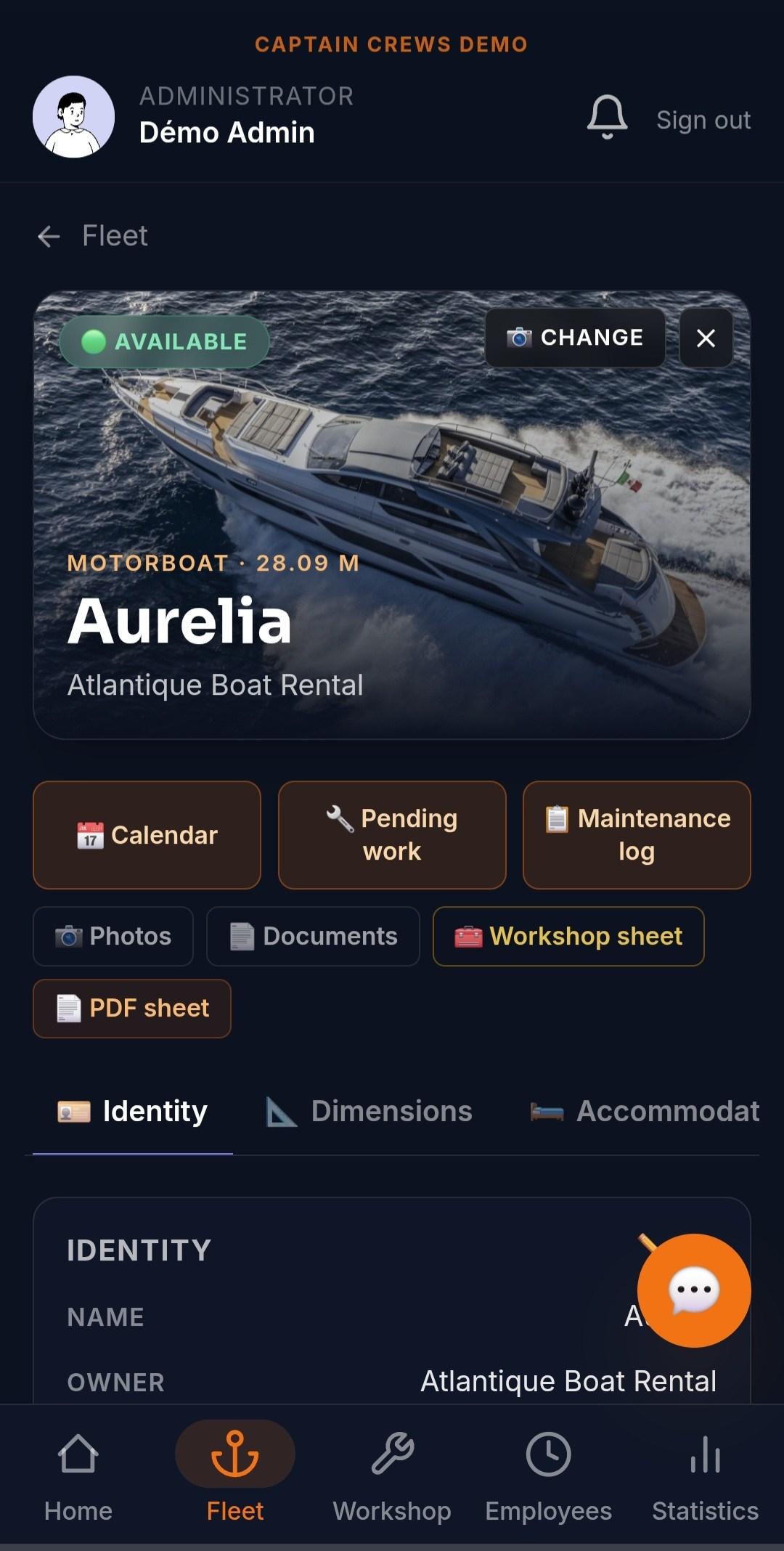
One system for your company, one portal per owner
Owner accounts are created by your company and linked to the boats each owner owns. From then on, what they open is limited to those boats: the fleet list, the jobs, documents, invoices, statistics, their exports and the answers of the AI assistant. On the Company plan, your client owners are invited at no charge. Owners sign in with email and password, can switch on two-factor authentication, and can add fingerprint sign-in on their phone. Captain Crews runs in the browser and installs on iPhone and Android like an app, and each person uses it in English, French or Spanish.
- Owner accounts created by your company, linked to their boats
- Fleet, jobs, documents, invoices and exports limited to the owner's boats
- Client owners invited free of charge on the Company plan
- Two-factor authentication and fingerprint sign-in for owners
- Web app installable on iPhone and Android, in English, French or Spanish
What the owner sees in the owner portal
The owner opens a live record of each of their boats: identity, engines and engine hours, status of the day, documents and history. They see the jobs scheduled or done on their boats, with the reports and photos you approved, and the supplier invoices and fuel lines filed against each boat. Their own dashboard shows their boats, the jobs to do or in progress, the jobs completed and, if they employ crew, that crew's clock-ins over the last 30 days and their leave requests. The owner is notified in the app and on the phone when a job on their boat is finished, when an invoice is added to their boat, and when someone else puts an entry on their boat's calendar. Every Monday, a summary in the app leads back to that dashboard, and owners can download a ZIP export of their own boats and crew.
- Live boat record: engines, engine hours, status of the day, history
- Jobs on their boats, with the reports and photos you approved
- Supplier invoices and fuel lines filed against each boat
- Notifications when a job is finished or an invoice is added
- An owner dashboard and a Monday summary in the app
You decide what reaches the owner
The reports and photos your technicians add to a job do not go straight to the owner: they wait for your approval. You approve them as they are, edit a report's text first, or keep them internal so the owner never sees them. A whole job can also be hidden from the owner, in which case it does not appear in their lists or counts. Each document has its own visibility, group by group: the company, the administration, the owner, the owner's crew and, if you tick it, a visitor. A new document is visible to the owner unless you untick it. When your team writes in French or Spanish and the owner reads in English, job titles, notes, checklist steps and reports are shown translated into the reader's language, and the original text is kept unchanged. For an outside party, such as a surveyor or a broker, a visitor account gives read-only access to the boats and the parts of the record you select.
- Reports and photos approved, edited or kept internal before the owner sees them
- Jobs hidden from the owner when they concern only your company
- Visibility set document by document: owner, their crew, visitor
- Job texts shown translated for an owner who reads another language
- Read-only visitor access for a surveyor, a broker or a guest
Requests and messages without the email chain
When an owner, or the crew they employ, wants work done, they request a job on the boat. Your company confirms it or suggests other dates, the requester is notified either way, and they can withdraw the request. Your office can start a thread with an owner, with attachments and an urgent flag, and the owner replies in that thread. Owners do not open new threads to your company themselves: they reply to yours or request work. An owner who employs their own crew can also give that crew work marked private to the boat, which stays between them and does not appear in your workshop.
- Job requests from the owner or their crew, confirmed or rescheduled by you
- The requester notified of every decision
- Threads from your office to the owner, with attachments and an urgent flag
- Private onboard work between an owner and their own crew
The technical management behind the portal
The portal only shows what your team records, so the operational side matters. Each job has a checklist, dated photos, the parts fitted (as free text), the people assigned and who really did the work, and a PDF job sheet with boxes to sign by hand. Recurring work is set up once as a work template, weekly, monthly or yearly, and the jobs are created automatically. Engine-hour thresholds warn you as a service falls due, documents and safety equipment have expiry reminders, and a Deadlines screen lists what is due or overdue, by urgency. You can name the people in charge of each boat's maintenance: they are notified of damage reports and of confirmed bookings to prepare. Supplier invoices and fuel receipts are read automatically, then checked by your office. A PDF data sheet of each boat, with its last 10 completed jobs, is ready to send to an owner, a buyer or an insurer.
- Workshop jobs with checklists, photos, parts and PDF job sheets
- Work templates that repeat weekly, monthly or yearly
- Engine-hour, document and safety-equipment reminders
- Named maintenance contacts per boat, alerted to damage reports
- PDF boat data sheet with the last 10 completed jobs
Your staff, the owners' crews and the captains
Management companies rarely employ everyone who works on the boats, and Captain Crews keeps the two groups apart. Your own staff clock in from their phone, in the workshop or aboard a boat, with overtime, leave and travel handled as described on our crew time tracking page. Crew employed by an owner are attached to that owner: the owner sees only them, approves their leave and closes their pay periods, and your office can still step in on a leave request. When your company employs the captains, you can give a captain up to five delegated rights on the boats in their scope: editing the boat record, managing the calendar, approving bookings, handling documents and photos, and closing or reopening workshop jobs. All five stay off until you switch them on.
- Company staff and owner-employed crew kept apart
- Owners approve their own crew's leave and close their periods
- Five delegable rights for company-employed captains, off by default
- Cruise days at a day rate for crew who go to sea
What Captain Crews does not do for management companies
Captain Crews is the operational record and the owner portal, not your billing or accounting system. It does not raise invoices to owners, track management fees or owner budgets, or take payments; your accounting software stays in charge of that. There is no portal branded with your logo and no custom web address. Owners are notified in the app and by push notification on their phone, not by email or SMS, and the app has no offline mode. It does not take online bookings or payments from charter guests, keep MLC hours-of-rest records or track crew certificates. Each company works in one currency (euro, US dollar, UAE dirham or Argentine peso) and one time zone.
- A clear scope: operations, owner visibility and crew time
- Exports in CSV, PDF and Excel files for your accounting software
- One working currency and one time zone per company
- Usable next to your booking, accounting and compliance tools
Frequently asked questions
What is an owner portal in Captain Crews?+
It is the owner's own login to Captain Crews, limited to the boats they own. The owner sees each boat's record and engine hours, the jobs done or planned with the reports and photos you approved, the documents visible to them, the supplier invoices and fuel lines filed against their boats, and their own dashboard. They can request a job and reply to your messages from the same place.
Can an owner see other owners' boats or our internal notes?+
No. An owner's view is limited to the boats linked to their account. Reports and photos reach them only after you approve them, anything you mark internal stays with your company, a job can be hidden from the owner entirely, and each document is visible only to the groups ticked on it: untick the owner for a document that should stay internal.
Can we invoice owners or track management fees in Captain Crews?+
No. Captain Crews does not raise invoices to owners, track management fees or budgets, or take payments. It holds the record behind your invoice: the jobs and their reports, supplier invoices and fuel per boat, and staff hours. You invoice from your accounting software, and the owner can check the work in the portal.
How do owners stay informed without monthly email reports?+
Through the portal itself. Owners are notified in the app and by push notification on their phone when a job on their boat is finished, when an invoice is added or when an entry is put on their boat's calendar, and a Monday summary in the app leads to their dashboard. Captain Crews does not send these updates by email. You can also hand an owner a PDF data sheet of the boat with its last 10 completed jobs.
Our owners speak different languages. Does that work?+
Yes, for English, French and Spanish. Each person uses the app and receives notifications in their own language, and the text your team types on jobs (titles, notes, checklist steps, reports) is shown translated into the reader's language, while the original is kept unchanged.
How much does it cost for a management company?+
Pricing is per user per month, not per boat. Management companies use the Company plan, which has no limit on boats or users; your client owners are invited at no charge, and staff who only clock in are billed at the lower Time tracking only rate. Current prices are on the pricing page. A 30-day trial with your own boats is opened on request, and you can ask for access to the demo account first.
Related guides
Show each owner the work, not just the invoice
Request a 30-day trial with your own boats and owners, or access to the demo account to try everything first. No credit card, no commitment.