
Yacht crew management software for crew time, leave and pay
Who is aboard, who is on leave, how many cruise days and what goes to the accountant: your crew's schedules, hours, leave and day rates in one place, boat by boat.
Captain Crews is yacht crew management software for the time, leave and pay side of running a crew: working schedules, daily hours, leave requests, cruise days paid at a day rate, and pay-ready figures for your accountant. It does not keep MLC hours-of-rest records, track crew certificates or plan rotations, so if compliance is what you need first, a dedicated crew compliance tool should sit next to it. It is built for yacht owners who employ a small crew, for the captains who run their boats, and for management companies that look after several boats and the people on them. Crew members use their phone; the owner or the office sees the team, approves leave and closes each pay period. Everything is organized by boat and by owner, and an owner only ever sees their own crew.
Crew accounts organized around the boat and its owner
Each crew member gets their own login, created by the owner or by the office, with a job title and only the rights they need: time tracking, travel, fleet, workshop, invoices, boat documents. Their standard working week (days, start and finish times, a fixed or free break) sets the expected hours that the rest of the system measures against. Crew attached to an owner stay inside that owner's scope, and the owner sees only them. When your company employs the captains itself, you can also delegate up to five management rights to a captain on the boats in their scope: editing the boat record, managing the calendar, approving bookings, handling documents and photos, and closing or reopening workshop jobs. All five stay switched off until you tick them.
- Logins for captains, crew and shore staff, each with a free-text job title
- Per-person rights: time tracking, travel, fleet, workshop, invoices, documents
- A standard working week and break rule for every crew member
- Each owner's crew kept apart from other owners and from company staff
- Five delegable rights for company-employed captains, all off by default
Daily hours from the phone, on the right boat
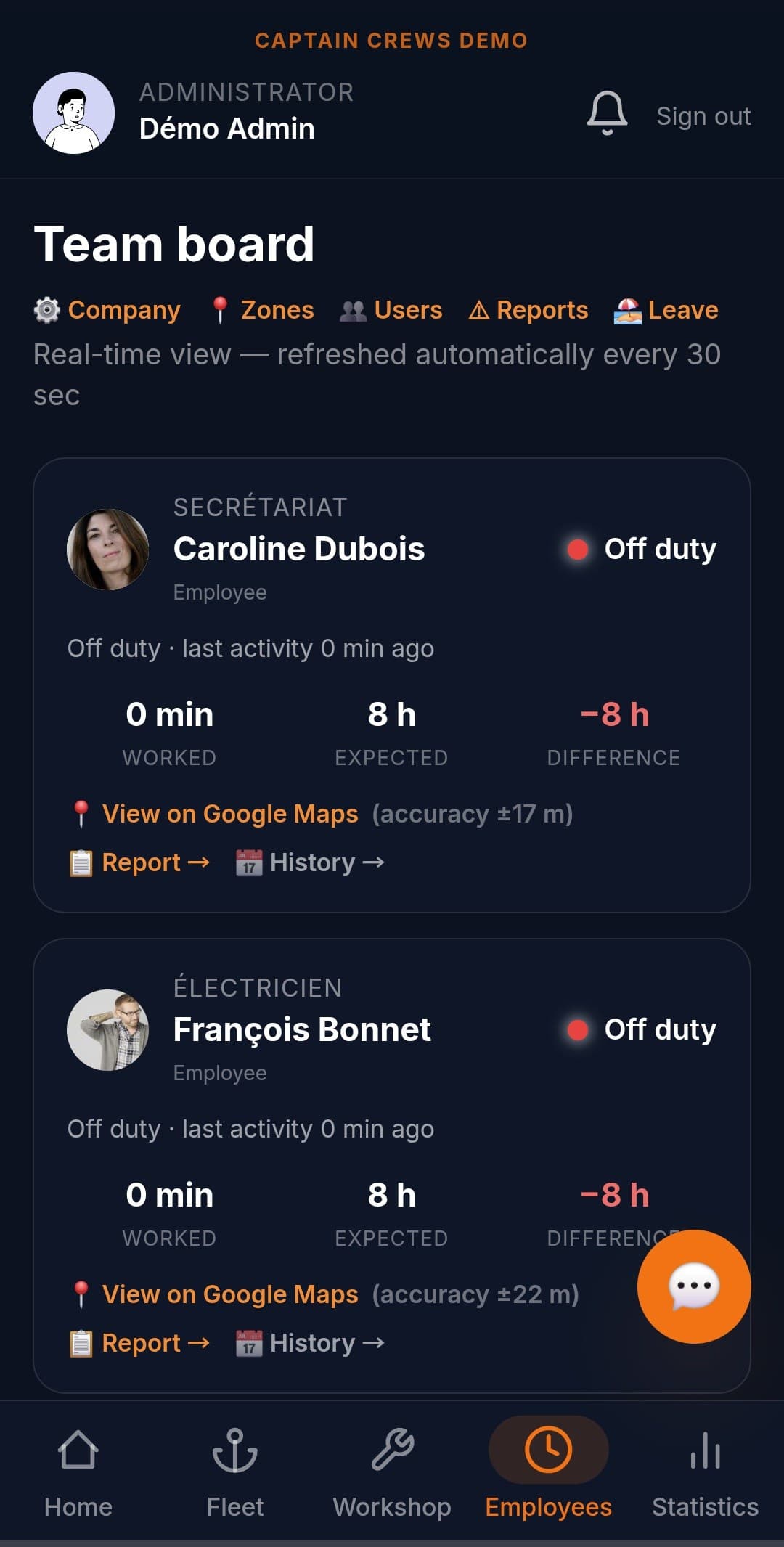
Crew clock in and out from their phone, choosing where they are: in the workshop, aboard a boat, on a break, or done for the day. The position is saved at each clock-in, and you decide per person whether GPS is compulsory. For skippers who move between boats, you can ask them to name the boat of the day at their first clock-in, so the time is attached to the right vessel. The owner or the office sees a team board with each person's current status, including who is away on a cruise, and today's hours against their schedule. From their clock-in screen, crew can also report a problem they find on a boat, with the location attached. The clock-in workflow itself is covered in more depth on our crew time tracking page.
- Clock-in options: workshop, aboard a boat, break, end of day
- Position saved at each clock-in, with GPS compulsory or optional per person
- Boat-of-the-day prompt for skippers who work across several boats
- Team board with live status and today's hours versus schedule
- Problem reports with location, sent to the office from the phone
Cruises: a day rate instead of hourly clocking
On a cruise, counting hours stops making sense. You put the cruise on the boat's calendar and tick the crew going aboard, and each of them gets a notification. When the trip starts, the crew member, the owner or the office opens a cruise session: normal clock-in is paused for that person, and every cruise day counts at the day rate set for them, with no double counting against their hours. If cruises are already part of someone's salary, you switch the day rate off and the days are simply recorded. The office and the boat's owner are notified when a cruise starts and when the boat is back, and the daily report shows who is on a cruise and at what rate.
- Cruise entries on the boat's calendar, with the assigned crew notified
- Hourly clock-in paused for the length of the cruise session
- Day rate set per person and adjustable at the start of each cruise
- Option for crew whose salary already covers cruises
- Cruises on a boat outside your fleet, logged by destination
Leave requests and a leave calendar for the whole crew
Crew request paid leave from their phone, as full days or, if you allow it, half days. The owner or the office approves or declines, with a reason when needed, and the crew member is notified of the decision. Sick leave and unjustified absences are entered by the manager. Each person's balance comes from an annual allowance set for the company and adjustable per person, and you choose whether a public holiday falling inside a leave period is deducted. A leave calendar shows public holidays, leave and absences side by side, so you can check who else is away before saying yes.
- Paid leave requested from the phone, in full or half days
- Approval or refusal with a reason, and a notification back
- Sick leave and absences recorded by the owner or the office
- Annual allowance per company, adjustable crew member by crew member
- Public holidays you enter for your company, shown on the calendar
Pay-ready figures at the end of every period
Captain Crews compares the hours each person worked with their standard week over your pay period (the calendar month, or a cycle such as the 26th to the 25th), after leave, public holidays and cruise days. That gives a running balance. At close, the owner or the office decides what happens to it: extra hours paid or carried into the next period, a shortfall taken from paid leave or carried over. The closed period is then locked. Your accountant receives figures and files rather than a payslip: an Excel workbook per person and per period for staff employed by the company (summary, day-by-day detail, leave, travel), plus a monthly timesheet PDF and CSV files per pay period from the Export screen. The accountant then applies contributions and issues the legal payslip.
- Pay period start day of your choice, from the 1st to the 28th
- Expected hours adjusted for leave, public holidays and cruise days
- One overtime multiplier per person, for example 1.5
- Period close with pay-out or carry-over, then locked
- Travel allowances by zone or per km on the Company plan
Owner, captain and office working from the same information
Much of crew management comes down to who knows what. Boat documents can be shared with the owner's crew or kept for the owner and the office, one document at a time, and a crew member opens boat documents only if you give them that right. The owner and the office can send notices to their crew, with attachments and an urgent flag, and crew can write back: to their owner if they are attached to one, otherwise to the office. If you allow it, crew photograph receipts (fuel or anything else) from their phone, say who paid, including themselves if they are owed a refund, and the receipt is read automatically and filed against the boat for the office to check. Notifications reach each person in their own language, English or French.
- Boat documents shared with the crew, or not, document by document
- Notices to the crew with attachments and an urgent flag
- Receipts photographed by crew, read automatically, checked by the office
- A "who paid?" field for crew who paid out of their own pocket
- Notifications in each person's language, English or French
What Captain Crews does not do for yacht crews
A lot of yacht crew management software is built around compliance, and Captain Crews is not a compliance tool. Where MLC 2006 applies, it asks for daily records of hours of work or rest, endorsed by the master; Captain Crews records hours worked for pay, not rest periods, and runs no rest-hour checks. It does not track crew certificates, medicals, passports or visas, does not produce crew lists for port clearance, and has no rota or rotation planner, no contracts and no recruitment module. It is not a payroll system either: no payslips, no tax or social security filings, and no multi-currency payroll, since each company works in one currency (euro, US dollar or Mauritian rupee, not pound sterling). Leave is an annual allowance rather than an accrual, and each company has one time zone, so a crew crossing time zones is still counted in the company's.
- A clear scope: working time, leave, cruise days and pay preparation
- Usable next to a dedicated hours-of-rest or crew compliance tool
- Data exports in CSV, PDF and Excel files
- Contributions, payslips and filings left to your accountant
Frequently asked questions
Does Captain Crews keep MLC hours of rest records?+
No. Captain Crews records clock-in and clock-out times to calculate hours for pay, but it does not log rest periods, check them against MLC 2006 minimums or produce a record for the master to endorse. If your yacht must keep hours-of-rest records, use a dedicated tool for that, and Captain Crews for schedules, leave, cruise days and pay figures.
Can it track crew certificates, medicals and passports?+
Not per crew member. Captain Crews has no crew certificate module, so STCW certificates, medicals, passports and visas are not tracked with expiry reminders. Expiry reminders do exist for boat documents, such as insurance or registration papers, and for safety equipment such as life rafts and extinguishers, with notifications before and after the date.
Is Captain Crews a yacht crew payroll system?+
No. It prepares the figures: hours worked against each person's schedule, overtime balance, cruise days at their day rate, leave taken and, on the Company plan, travel allowances. Your accountant or payroll provider then applies contributions, issues the legal payslip and makes the filings. Captain Crews does not pay crew, run payroll in several currencies or submit anything to the authorities.
How are crew paid for days on a cruise?+
Through a cruise session. When a crew member starts one, their hourly clock-in is paused and each cruise day counts at the day rate set for them, which can be adjusted at the start of every cruise. For crew whose salary already includes cruises, the day rate is switched off and the days are recorded without an amount.
Can a yacht management company run several owners' crews in one account?+
Yes. Crew can be employed by your company or attached to a particular owner. Each owner sees and manages only the crew attached to them (schedules, leave, pay period close) and never another owner's crew, while your office manages the staff it employs directly. Captains employed by the company can be given delegated rights on the boats in their scope.
How much does it cost for a small yacht crew?+
Pricing is per user per month. Crew who only clock in cost €5. On the Owner plan (up to five boats), the owner and each captain or technical crew member cost €9; on the Company plan, the director, managers, mechanics and captains cost €12. Every plan starts with a 30-day free trial.
Related guides
Put your crew's time, leave and pay in one place
Start a 30-day free trial with your own boat and crew, or book a demo and we will go through what fits your setup and what does not.