

Crew Time Tracking Software Built for Marine Teams
Mobile GPS clock-in, automatic overtime, travel and zone allowances, leave, and ready-to-share PDF pay summaries — for boatyards, fleet managers, and charter operators.
Captain Crews is crew time tracking software made for the way marine teams actually work: mechanics on the dock, deckhands between berths, crew clocking in from a phone with patchy signal, and a manager who needs clean hours at the end of the month. Your crew clocks in from their mobile with GPS location captured at the tap, and the platform turns those raw clock events into worked hours, expected hours, overtime, travel and zone allowances, and leave — all in one place. At period close, you export a PDF pay summary and a clean file your accountant can use. To be clear: Captain Crews calculates the hours and generates the pay summary and exports; it is not a statutory payroll filer and does not submit payroll taxes or issue a certified payslip. That stays with your accountant or payroll provider — we just make sure the numbers reaching them are right.
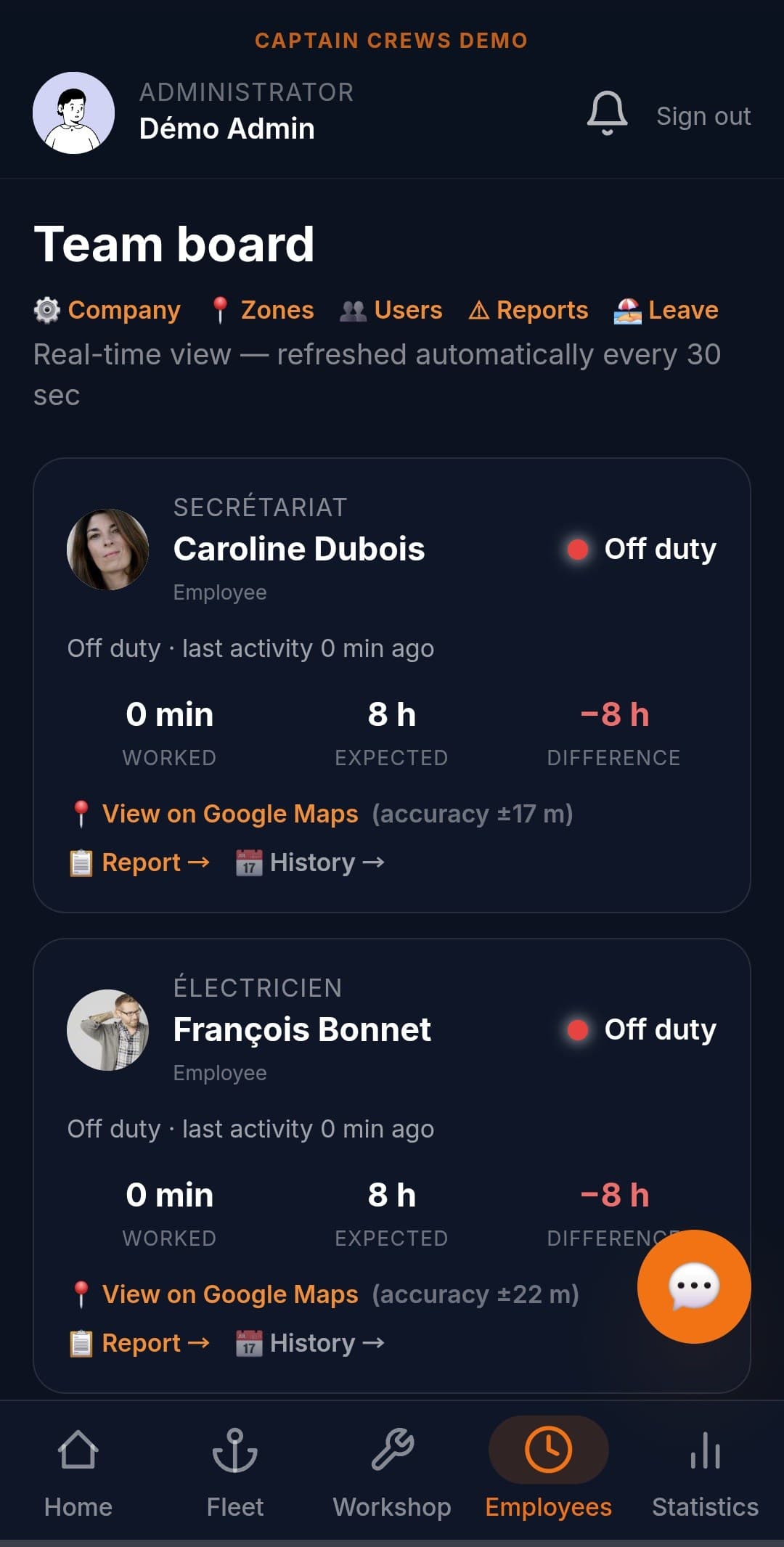
Mobile GPS clock-in your crew will actually use
Most marine work happens away from a desk, so the timesheet has to live in your crew's pocket. With Captain Crews, crew members clock in and out from the mobile app, and location is captured at clock-in so you have context on where the day started. It works on iOS and Android, and because it is mobile-first, it holds up on a phone at the dock rather than only on a back-office screen. Managers see who is on the clock in real time, and a built-in alert flags a probable missed clock-out (for example, a state left open past 16 hours) so a forgotten tap never quietly inflates someone's hours.
- Mobile clock-in/out with GPS location captured at the tap
- Native iOS and Android apps, designed mobile-first for dock conditions
- Live view of who is currently clocked in
- Missed clock-out alerts so forgotten taps don't distort hours
- Per-crew clock history every manager can review and correct
Hours, overtime and allowances calculated automatically
This is where a generic time clock stops and marine reality begins. Captain Crews compares each crew member's worked time against their expected schedule and computes overtime, bonuses, travel reimbursement, and zone-based allowances automatically — using the rates and zones you configure for your business, not hard-coded assumptions. Cruise days are handled correctly too: they are paid at a flat daily rate and neutralised in the hourly calculation, so an open clock state at the start of a cruise never adds phantom hours. Every figure on a pay summary comes from one shared calculation engine, so the number a mechanic sees on their phone matches the number on the manager's export.
- Automatic overtime and bonus calculation against each crew member's schedule
- Travel reimbursement and zone-based allowances using your own configurable rates
- Cruise days paid at a flat daily rate, kept out of the hourly count
- Worked vs. expected hours and running balance, per person and per period
- One calculation engine behind every screen — no diverging totals
Custom pay periods, leave, and multi-timezone
Marine businesses rarely run on a tidy calendar month. Captain Crews lets you set a custom pay period — for example the 26th to the 25th — and every recap, balance, and export honours it. Leave is built in: paid and unpaid leave is tracked, deducted, and reflected in the period totals, with leave quotas handled proportionally so a part day counts as a part day. If your crews span locations, the multi-timezone engine derives each tenant's local day and pay-period boundaries from a proper IANA timezone, with daylight-saving handled natively — so an hour worked is logged correctly whether your base is in the Mediterranean, the Caribbean, or the Indian Ocean.
- Custom pay period boundaries (e.g. 26th to 25th) applied everywhere
- Paid, unpaid and sick leave tracked and reflected in period totals
- Proportional leave quotas so half days count as half days
- Per-tenant IANA timezone with native daylight-saving handling
- Holiday and arrangement handling folded into the same recap
Clean PDF pay summaries and exports for your accountant
At the end of a period, Captain Crews produces a PDF pay summary per crew member — worked hours, overtime, allowances, leave, and balance — plus a data export your accountant or payroll provider can pick up directly. This is the precise boundary worth understanding: the platform does the calculating and the documenting, then hands clean, reconciled numbers to whoever runs statutory payroll. Captain Crews does not file payroll taxes or issue a certified statutory payslip. You also keep full ownership of your data: a one-click full export gives you everything in a portable form, in line with GDPR data-portability (Article 20), so you are never locked in.
- PDF pay summaries per crew member, ready to share
- Accountant-ready export to hand off for statutory payroll
- Calculation and documentation done in-app; statutory filing stays with your provider
- One-click full export of your data (GDPR Article 20 portability)
- Audit-friendly trail of clock events, edits, and approvals
Frequently asked questions
Is Captain Crews a payroll service that pays my crew and files taxes?+
No, and we are precise about this. Captain Crews tracks time, calculates hours, overtime, travel and zone allowances, and leave, then generates PDF pay summaries and exports. It does not file payroll taxes or produce a certified statutory payslip. You hand the reconciled figures to your accountant or payroll provider, who runs statutory payroll. Think of Captain Crews as the accurate source of hours and amounts that feeds your existing payroll.
How does GPS clock-in work if my crew has poor signal at the dock?+
Crew clock in and out from the mobile app, and GPS location is captured at the moment of clock-in to give you context on where the day started. The app is mobile-first and built to be used on a phone in real working conditions. Managers can review and correct any clock entry, and a missed clock-out alert flags a state left open too long, so a weak-signal moment or a forgotten tap never silently distorts the hours.
Can it handle custom pay periods, overtime rules, and travel allowances specific to my business?+
Yes. You set your pay period (for example the 26th to the 25th), and Captain Crews applies it across every recap and export. Overtime, bonuses, travel reimbursement, and zone-based allowances are calculated automatically from the rates and zones you configure, not from hard-coded defaults. Cruise days are paid at a flat daily rate and kept out of the hourly count. Multi-timezone is supported with native daylight-saving handling for crews across different locations.
See your crew's hours add up correctly
Start a 30-day free trial — no credit card required. From €5 per user per month, with mobile GPS clock-in, automatic overtime and allowances, and PDF pay summaries ready for your accountant.